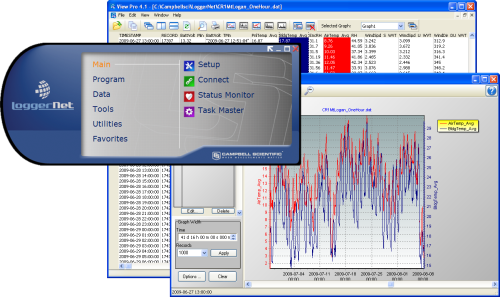
包含高级编程和通讯功能


概览
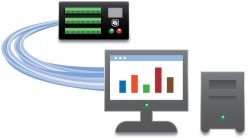
LoggerNet is our main data logger support software package. It supports programming, communication, and data retrieval between data loggers and a PC.
LoggerNet consists of a server application and several client applications integrated into a single product. It can support connection to a single data logger, but it is especially adept in applications that require telecommunications or scheduled data retrieval used in large data logger networks.
A copy of the current software license agreement (end-user license agreement) for LoggerNet is available in the LoggerNet Instruction Manual.
优势与特点
- Creates custom data logger programs using Edlog or CRBasic
- Displays or graphs real-time or historic data
- Builds custom display screens to view data or control flags/ports
- Retrieves data using any of our telecommunication options
- Processes data files using Split
- Saves data in formats (including CSV and XML) that can be imported into third-party analysis packages
图像
技术说明
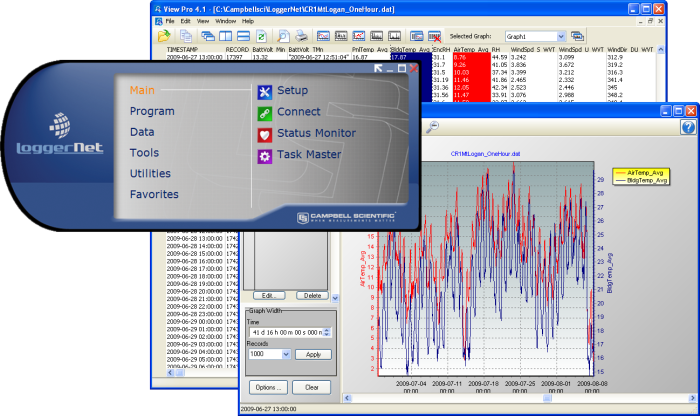
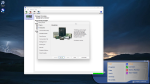
标准的LoggerNet 软件包推荐给那些拥有自己的数据采集器网络,而又不需要LoggerNet Admin中所提供的更多高级特性的用户。它包括LoggerNet 服务器和客户端应用程序,可让您对数据采集器进行编程、下载数据、监控网络及处理故障、管理网络中的数据采集器、创建绘图数据显示(当数据下载时会更新)、创建自动任务以及查看或后处理数据。LoggerNet 服务器将数据存储在缓冲区,并将数据写入多种格式的数据文件,包括ASCII、二进制和XML。
LoggerNet 可让您实现以下功能:
- 设置服务器与多个数据采集器进行通讯,通过多种通讯硬件。
- 创建自定义的数据采集器程序,使用Short Cut、Edlog 或 CRBasic 编辑器
- 连接到一个数据采集器,检查或设定时钟,发送工作程序,或实施其它管理功能。
- 表格显示或绘图显示数据
- 建造自定义的显示窗口,查看数据或控制标志/端口。
- 按需要或定时下载数据
- 使用Split来处理数据文件
- 以其它格式(包括CSV 和 XML)保存数据,可导入到第三方分析软件。
版本历史
|
产品规格
| Operating System | Windows 11 or 10 (Both 32- and 64-bit operating systems are supported.) |
| Requirement | .NET 4.6.2 |
| Purchased Separately | Yes |
| Software Level | Intermediate to advanced |
| Communications Supported |
Direct connect, Ethernet, short-haul, phone modems (land-line, cellular, voice synthesized), RF transceivers (UHF, VHF, and spread spectrum), multidrop modems Combinations of communication devices supported. |
| Scheduled Data Collection Supported | Yes |
| Data Display Supported | Numeric, graphical, Boolean data objects |
Military Certificate of Networthiness (CoN) |
|
| Certifications |
|
兼容性
Please note: The following shows notable compatibility information. It is not a comprehensive list of all compatible products.
数据采集器
| Product | Compatible | Note |
|---|---|---|
| 21X (retired) | The 21X requires three PROMs; two PROM 21X Microloggers are not compatible. | |
| CR10X (retired) | LoggerNet is compatible with the mixed array, PakBus, and TD operating systems. | |
| CR23X (retired) | LoggerNet is compatible with the mixed array, PakBus, and TD operating systems. | |
| CR510 (retired) | LoggerNet is compatible with the mixed array, PakBus, and TD operating systems. |
软件
| Product | Compatible | Note |
|---|---|---|
| KonectGDS |
Additional Compatibility Information
Data Logger Considerations
LoggerNet supports Campbell Scientific data loggers.
Communications
LoggerNet runs on a PC, using serial ports, telephony drivers, and Ethernet hardware to communicate with data loggers via phone modems, RF devices, and other peripherals.
Software
The development tool of RTMC Pro 1.x and 2.x is not compatible with the RTMC run-time and the standard RTMC development tool in LoggerNet 4. An upgrade for RTMC Pro must be purchased separately.
Computer
LoggerNet is a collection of 32-bit programs designed to run on Intel-based computers running Microsoft Windows operating systems. LoggerNet runs on Windows 10 and Windows 11. LoggerNet runs on both 32-bit and 64-bit versions of these operating systems.
Other Products
LoggerNet supports most commercially available sensors, SDM devices, multiplexers, relays, vibrating-wire interfaces, ET107, CompactFlash cards, microSD cards, and PC cards.
视频与教程










下载
LoggerNet Patch v.4.10.1 (409 MB) 09-04-2026
This patch will upgrade LoggerNet, LoggerNet Remote or LoggerNet Admin version 4.0 and newer to 4.10.1. A version of LoggerNet 4.x must be installed on the computer.
Note: This patch includes RTMC Run-time and the RTMC Standard Development v5.0.1. If you are using RTMC Pro 4.3.3 or older or CSI Web Server 1.6 or older and plan to continue creating RTMC projects, we recommend that you opt out on updating RTMC during the install or upgrade to RTMC Pro v5.0.1.
LoggerNet Admin and Remote:
A change was made in the way the LoggerNet 4.6 Server performs "Custom Data Collection". A corresponding change was made in the Connect Screen 4.6 client "Custom Data Collection" functionality.
If you require "Custom Data Collection" functionality with the Connect Screen client, assure that the LoggerNet Servers and Connect Screen clients are 4.6 or higher.
This application requires the Microsoft .Net 4.6.2 Framework. If it is not already installed on your computer, it can be obtained from the Microsoft Download Center.
Supported Operating Systems: (32 and 64 bit) Windows 11 or 10.
What's new in LoggerNet 4 Tutorial (exe format) v.- (12.9 MB) 14-09-2009
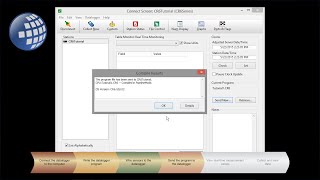
LoggerNet 4.0 was released in August of 2009. This tutorial demonstrates some of the new features and enhancements. Two new applications, View Pro and the Network Planner, are introduced.
LoggerNet Trial v.4.10.1 (413 MB) 09-04-2026
This is a fully functional 30 day trial of the standard version of LoggerNet. This is a trial only and can not be activated as a full version with a license key. (Network setup and data is preserved from the trial when installing the full version.)
Current LoggerNet users: It is recommended that you install the trial on a computer other than the one running your existing LoggerNet. If that is not practical, we strongly recommend you back up the LoggerNet working directory to prevent backward compatibility issues if you revert to a previous version. To revert you must re-install LoggerNet using the original disk and software key.
Note: This application requires the Microsoft .Net 4.6.2 Framework. If it is not already installed on your computer, it can be obtained from the Microsoft Download Center.
Supported Operating Systems: (32 and 64 bit) Windows 11 or 10.
常见问题解答
LoggerNet: 122
展开全部收起全部
-
A client lock is automatically created by the Setup screen when a user begins to make changes. This lock will remain until the changes have been committed or cancelled, or until the connection between the Setup screen and the LoggerNet server is severed.
-
In the LoggerNet Setup screen, use the Schedule tab.
-
The LoggerNet server imposes no specific limits on the lengths of the generic modem scripts.
-
First, make sure the most recent version of LoggerNet is being used. (Improvements were made between versions 4.0 and 4.1 that resolved some issues with LoggerNet and some USB-to-serial cable drivers.) Next, ensure that the most recent drivers from the cable manufacturer are being used. Often, newer drivers are developed for devices after they are released, and the software shipped with those devices is not updated. The drivers can be downloaded from the manufacturer's website.
-
LoggerNet and VisualWeather are the only datalogger support software packages, offered by Campbell Scientific, that perform scheduled data collection.
-
For the current licensing information, refer to the LoggerNet Instruction Manual.
-
The port is set during the setup process in the modem and then in the Setup screen of LoggerNet. The port of 3001 is the default in the Raven templates supplied by Campbell Scientific.
-
The LoggerNet Toolbar uses the TCP/IP protocol to communicate with the LoggerNet server. If two instances of LoggerNet are being run on the same computer, there would be a TCP/IP port conflict because they are both trying to use the same port.
-
In the LoggerNet Setup screen, on the Data Files tab, there are these Collect Mode options:
- Data Logged Since Last Collection
- Most Recently Logged Records
- Collect At Most
-
Typically, blue screens are the result of bad device drivers. The Internet can be very helpful in tracking down the cause of blue screens. Copy down the codes displayed. Search the Internet for “blue screen” and the code to see what device is causing the crash. Often, an updated device driver will resolve the issue.
案例研究

Overview The Kameng Hydroelectric Power Project (KaHPS) sits deep in the Himalayan foothills of Arunachal Pradesh,......阅读更多

In Southern Idaho, the roads are often dirt, the bright blue sky is expansive, and......阅读更多

Overview The Department of Soil, Crop, and Climate Sciences at the University of the Free State......阅读更多

Overview The Udhampur-Srinagar-Baramulla Rail Link (USBRL) project is of national importance as it connects Kashmir to the......阅读更多
In 2019, Campbell Scientific embarked on a significant project with the Malawi Department of Climate......阅读更多

The Delaware Department of Transportation (DelDOT) notified Intelligent Infrastructure Systems (IIS) and Pennoni of the......阅读更多

Intelligent Infrastructure Systems, a Pennoni company, was contracted to design and install an efficient structural-health......阅读更多
The semiarid region just north of the Black Hills in western South Dakota has vast......阅读更多
文章和新闻发布
博客文章
-
Behind the Scenes: Scientifically Adding Some Jingle to the Holidays

17-12-2024 作者: Eric Schmidt